
Mass Mutate step is available in the Block Store. Use it to create, update, or delete many records at once. To add it to your application, go to the Block Store and search for Mass Mutate.
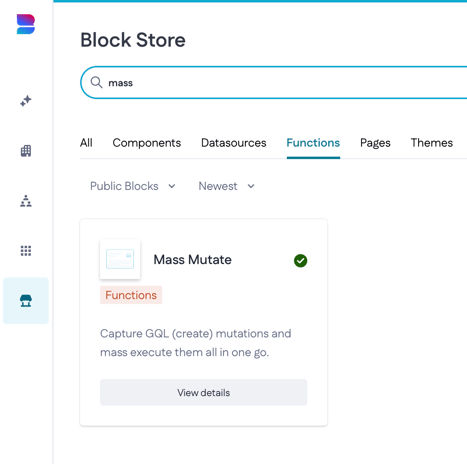
Click on View details followed by Install block to install the block to the appropriate organization and application. Once installed, we can use the step in our application.
Prerequisites
The following data models are pre-created to showcase what the step is about:

The above models form Questionnaire template; within this template, we can then generate questionnaires using the Mass Mutate step.
This example uses four data models:
- QuestionnaireTemplate and QuestionTemplate hold the template and its questions.
- Questionnaire and Question hold the questionnaires made for each employee, with their questions.
The questionnaire template and its questions already exist. The action uses them to create a questionnaire, with its own set of questions, for every employee in the Employee model. The template itself doesn't change and isn't copied.
This example has only a few employees. Now imagine a large company with 20,000 employees and a template with 25 questions. If you loop through the employees and create each record one by one, that's 20,000 questionnaires plus 500,000 questions, so more than half a million records. With Mass Mutate, the action collects these records and creates them together, which makes it much faster.
Power of Mass Mutate
The Mass Mutate makes the example above a lot faster; this step 'intercepts' the call to the database. So instead of doing a create half a million times, it'll save them up and then insert them in one go.
Note: Mass Mutate works with Create Record, Update Record, and Delete Record steps. It collects them and sends them to the Data API in one request per model. Because of this, the steps inside Mass Mutate have to follow a few rules, described in Limitations below
Now, let’s take the action that creates questionnaires based on the Questionnaire template.

In the Start step, create an input variable for the ID of the questionnaire template:
- Kind: Number
- Name: questionnaire_template_id

Next, create a variable that gets the questionnaire template record by its ID:
- Kind: Record
- Name: questionnaire_template_object
- Model: QuestionnaireTemplate
- Filter: Id equals questionnaire_template_id

Then create a variable that gets all employees:
- Kind: Collection
- Name: employee_collection
- Model: Employee

Add the Mass Mutate step as the first step of the action. It doesn't need any configuration. The steps that follow are placed inside the Mass Mutate step. It collects all the records they create and creates them together, so the action runs much faster.
Inside the Mass Mutate step, add a Loop step that goes through the employee collection:
- Collection: employee_collection
- Iterator name: employee

Inside this Loop step, add a Create Record step that creates one questionnaire for each employee:
- Model: Questionnaire
- Value mapping:
- Employee (relation) → employee, the current employee in the loop
- Name (text) → questionnaire_template_object.name
- As: new_questionnaire

Inside the same Loop step, after the Create Record step, add a second Loop step that goes through the questions of the template:
- Collection: questionnaire_template_object.QuestionTemplates
- Iterator name: question

Inside this second Loop step, add a Create Record step that creates a question for each question template:
- Model: Question
- Value mapping:
- Questionnaire (relation) → new_questionnaire
- Question (text) → question.Question
- As: new_question

If we execute this action and we provide an ID of the questionnaire template we'll create questionnaires for all our employees. In this use case, I only have 8 employees and 3 questions in my template but when I run the action via the Playground we can see that they're being created with the associated questions.
Questionnaire:

Questions:

Limitations
All records must map the same properties
Mass Mutate combines all Create Record and Update Record steps into one request per model. That request accepts only one set of properties for all records, so every Create Record or Update Record step for the same model must map exactly the same properties. If one step maps a property that another step doesn't, the whole request fails with:
On mutation 'upsertMany<Model>', all inputs must have the same fields, please verify '<Property>'.
This could happen when you use Condition steps to update different properties in different branches. For example, one branch updates Acquisition date and another branch updates Last day of transaction.
To fix this, map the same properties in every step. If a value depends on a condition, calculate it in an Expression step instead of splitting the flow with Condition steps. If a property shouldn't change for a record, make the expression return the record's current value.
Empty values count as missing properties
If a mapped value is empty (null) for one record, that property is left out of the request for that record. This causes the same error as above, even when all steps map the same properties. It can happen without any Condition steps, for example, when a variable or expression returns nothing for one of the records.
To avoid this, calculate the value in an Expression step and give it a fallback value for when the result is empty. For example, return the record's current value when you update a record, or a default value that fits the property type when you create one.
Required properties must always be mapped
If your model has required properties, map them in every Create Record and Update Record step inside Mass Mutate. If you leave them out, the request fails with:
"message": "'name' is required."
- Create Record steps: map the required properties.
- Update Record steps: map the required properties too, even when the record already has a value for them. To keep the existing value, map each one to the record's current value.
Has-many and has-and-belongs-to-many relations can't be assigned
When you place Create Record or Update Record steps inside a Mass Mutate step, all mutations on the same data model are merged into a single upsertMany mutation. This mutation doesn't support has-many or has-and-belongs-to-many (HABTM) relation assignments. This is a known limitation, so you can't assign these relations in the value mapping of steps inside Mass Mutate. If you do, the Data API returns an error like this:
"message": "Arguments 'input.participantRoles' do not exist on 'upsertManyPolicy'."
In this example, participantRoles is the relation and Policy is the data model.
Belongs-to relations work as usual inside Mass Mutate. Assign has-many and HABTM relations in a separate step, after the Mass Mutate step.
Sub actions aren't included
Create Record and Update Record steps anywhere inside Mass Mutate are batched, including steps inside Loop and Condition steps. Steps inside a Sub action step aren't batched. They still run, but one by one, as they would without Mass Mutate. You won't see an error or a warning message, so this is easy to miss.
If performance matters, move the Create Record and Update Record steps out of the Sub action and into the Mass Mutate step.
Create or Update Record steps aren’t batched
Mass Mutate only batches Create Record, Update Record, and Delete Record steps. Create or Update Record steps inside a Mass Mutate step aren’t batched. They still run, but one by one, as they would without Mass Mutate. You won’t see an error message, so this is easy to miss.
If performance matters, replace the Create or Update Record step with separate Create Record and Update Record steps inside the Mass Mutate step. Use a Condition step and an Object variable beforehand to decide whether you need to create or update the record.
When to use a custom function instead
If your action needs different property sets for different records, Mass Mutate might not be the right fit. In that case, write a custom function that builds the input arrays itself and calls the upsertMany mutation directly.
See Data API reference for the mutation syntax.