
To add an action step to Betty Blocks, you need its Wasm file. Action steps are published as components on GitHub, so this guide walks through installing the wash CLI and pulling the Wasm file from there.
Installing the wash CLI
wash is the command-line tool for the wasmCloud stack, and it's what you'll use to fetch Wasm files.
Follow the official wasmCloud installation guide and pick the instructions for your operating system.
Note: Older versions of wash may exist on your system. Make sure they're uninstalled before installing the current version
To confirm the install worked, run:
wash --version
You should see something like:
wash 2.0.4
Any extra lines or warnings are fine – you can ignore them.
Pulling a Wasm file
With wash installed, you can fetch the Wasm file for any published component (the action step you want to add).
1. Go to the component's GitHub page, for example: https://github.com/wasco-dev/glyphic-api
2. On the right-hand side of the repo, find the Packages section.
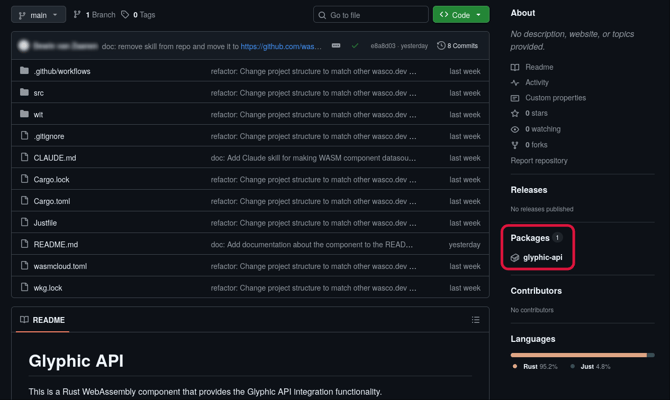
3. Click Packages to open the list of available components — usually one per page. You can also go straight to the packages page if you know the URL, for example: github.com/wasco-dev/glyphic-api/pkgs/container/glyphic-api
4. If it says "No packages published", the component hasn't been uploaded to the GitHub package registry. Ask the component author to publish it.
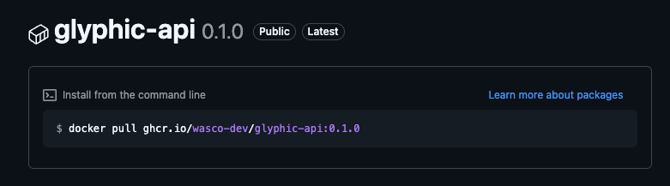
5. Click the component you want. You'll see its versions and a suggested pull command.
The command GitHub shows won't give you a .wasm file directly. Use wash pull instead:
wash oci pull ghcr.io/wasco-dev/glyphic-api:0.1.0
The file is downloaded to the directory where your terminal is currently located.
When you run wash oci pull ghcr.io/wasco-dev/glyphic-api:0.1.0, the command now also shows you where the component was saved. The file is named component.wasm, so if a file with that name already exists in your current folder, it will be overwritten.
After running the command, you'll see output like:
Pulled and saved component to C:\Users/<username>/component.wasm
-2.png?width=557&height=38&name=image%20(4)-2.png)
The path tells you exactly where the file landed. Good luck!