
You can use the content components to apply different types of content. For example, to include a carousel of images.
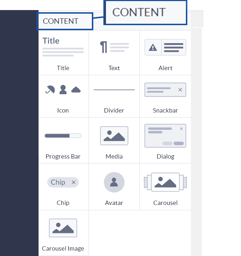 |
The content components are used for applying different types of content on your web pages. As shown, these vary from specifying Title text to an Avatar for your application. Each component can be customized using the component specific options in the Options menu displayed when you select a component. |
The following content components are available:
Title |
 |
You can use the predefined Title components to create consistent title text for your application. |
|
Text |
 |
Text components are text with predefined options that display them in a body text format. |
|
Alert |
 |
Alert components are pop up windows with a message inside of them. They can be used to notify/alert users. |
|
Icon
|
 |
Icon components are icons that can be placed inside of many different components. All icons are retrieved from the MaterialUI website. |
|
Divider |
 |
Divider components are used to separate components from each other and create a layout. |
|
Snackbar
|
 |
Snackbar component is used to create a brief feedback message to a user. The message is displayed for a specified period, normally a matter of seconds, as a type of nod to an end user. |
|
Progress Bar |
 |
Progress Bar components display progress based on specified values. |
|
Media |
 |
Media components are used to display images on your page. The link address of the image that you want to display. |
|
Dialog |
 |
Dialog component is used for building a pop-up window that you can customize. For example, to request information, such as an email address. |
|
Chip |
 |
Chip components are labels that display text. Often used to show multiple values in a single component, e.g. a multi-optional filter. |
|
Avatar |
 |
Avatar components are avatars that can contain either an image, a letter, or an icon. Often used as profile pictures or to distinguish categories. |
|
Carousel |
 |
Carousel component can be used for displaying a series of images. |
|
Carousel Image |
 |
Used for including various images in a Carousel component. |